
Quick Answer: How to Unban a Disabled Meta Ad Account
If your Meta Ad Account or Business Manager has been disabled, do not immediately create a brand new account from the same browser—this triggers an instant fingerprint ban for evading enforcement. Instead: (1) Navigate to Meta Account Quality (business.facebook.com/accountquality), (2) Complete identity verification using an official government ID with 2FA enabled, (3) Audit landing pages to eliminate prohibited claims, before-and-after imagery, and non-functional buttons, and (4) Open an escalated ticket through Meta Business Support Concierge Live Chat with a formal, respectful, policy-referencing compliance letter.
Why Meta Disables Ad Accounts in 2026
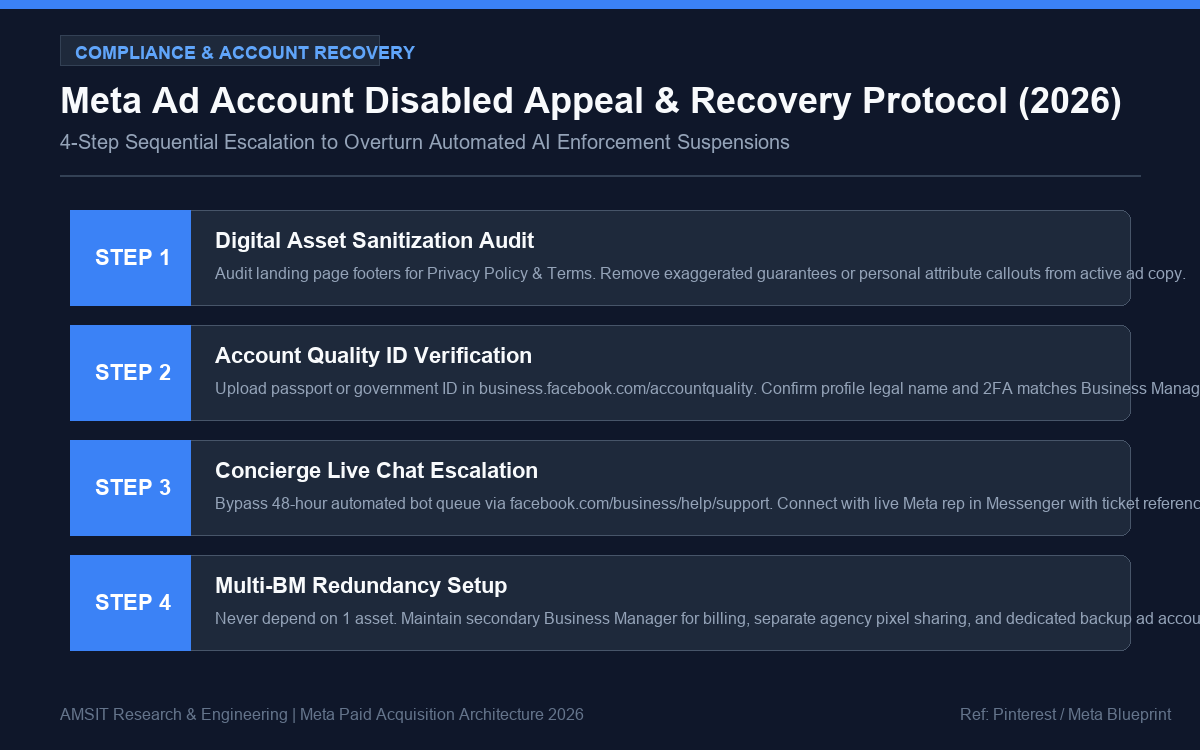
Visual Flowchart: AMSIT Policy & Compliance Engineering
Over 85% of ad account bans are executed by automated AI compliance bots rather than human policy reviewers. Meta’s automated scanning crawlers parse your ad imagery, video audio transcripts, primary text captions, privacy policies, and final landing page destination code.
Common triggers for immediate automated suspension include:
- Unacceptable Business Practices (Policy 4.1): Promising unrealistic timelines (“Make ₹50,000 in 2 days” or “Lose 10kg in 1 week without exercise”).
- Personal Attributes Callouts: Phrases that imply user characteristics (“Are you suffering from severe debt?” or “Do you hate your acne?”).
- Landing Page Non-Compliance: Missing Terms of Service, Privacy Policy, contact email/phone, or physical business address in the footer.
- Payment Method Mismatch: Using a personal credit card with a billing name completely different from the Business Manager legal entity name.
- Sudden Budget Explosions: Scaling a brand new ad account from ₹500/day to ₹25,000/day within 48 hours of creation.
The 4-Step Reinstatement Blueprint
Step 1: Perform the Pre-Appeal Compliance Audit
Before requesting a review, you must sanitize your digital assets. If a human reviewer inspects your account and encounters active policy violations, your restriction becomes permanent.
- Check your website footer. Verify that links to Privacy Policy, Terms and Conditions, and Refund Policy are working and accessible without login barriers.
- Scan all active ad copy for absolute promises. Replace “Guaranteed results” with “Engineered for optimal performance.”
- Ensure the domain DNS has valid SPF, DKIM, and SSL certificates installed.
Step 2: Submit Identity Verification in Account Quality
- Log into
business.facebook.com/accountquality. - Locate the disabled asset under Account Status Overview.
- Click Request Review. If prompted for identity confirmation, upload a clear, high-resolution photo of your Passport, National ID, or Driver’s License.
- Ensure the full name and date of birth on your ID match your personal Facebook profile exactly.
Step 3: Escalate to Live Meta Concierge Support
If automated review requests remain pending for more than 48 hours, bypass the queue via live agent chat:
- Visit
facebook.com/business/help/support. - Scroll down and select Contact Support.
- Select your disabled Ad Account > Issue: My ad account is disabled.
- Click Start Chat to connect with an operational representative inside Meta Messenger.
Step 4: The Proven Reinstatement Appeal Template
Use this professional, non-confrontational communication framework when conversing with Meta support agents:
Dear Meta Policy Team,
Our business ([Insert Business Name]) has been advertising on the Meta platform in strict accordance with Advertising Standards. On [Insert Date], our Ad Account was unexpectedly flagged for [Insert Policy Reason, e.g., Unacceptable Business Practices].
We take compliance seriously. We have conducted a thorough internal audit of all our active creatives and landing pages to ensure total alignment with Meta Advertising Policies. Specifically, we have verified that:
1. All landing pages feature active Privacy Policies, verifiable business contact details, and transparent terms.
2. No sensationalized claims, deceptive wording, or restricted personal attributes are present in any active copy.
3. Our payment details and corporate registration match our Business Manager profile.
We believe this restriction was triggered erroneously by automated scanning filters. We respectfully request an expedited manual review by a human compliance specialist to restore our account standing so we may resume our marketing campaigns.
Sincerely,
[Your Full Name]
[Your Company Title]
How to Safeguard Your Infrastructure Against Future Bans
Experienced growth agencies never rely on a single vulnerable point of failure. Construct an enterprise-grade advertising backup matrix:
- Multiple Verified Business Managers: Maintain a primary BM for pixel data management and a secondary BM dedicated to billing and execution.
- Two-Factor Authentication (2FA) Enforcement: Mandate 2FA for every administrator inside your Business Manager to prevent security flags.
- Pixel Data Segregation: Share your core Meta Pixel across separate ad accounts as an agency asset so historical conversion tracking survives account disruptions.
For guidance on setting up server-level conversion integrity, review our complete Meta Conversions API (CAPI) Setup Guide.
Frequently Asked Questions
How long does an appeal review typically take?
Standard automated reviews take between 24 and 48 hours. However, if escalated via Meta Concierge Live Chat with an internal ticket reference number, resolutions often occur within 4 to 12 hours.
What should I do if Meta issues a “Final Decision” rejection?
If the Account Quality portal declares a decision final, that specific ad account is retired permanently. Do not abandon your pixel. Share the Pixel and Custom Audiences with an alternate Business Manager, attach a clean payment card from a different issuing bank, and resume campaigns.
