
Quick Answer: How to Set Up Meta Conversions API (CAPI)
Meta Conversions API (CAPI) creates a direct server-to-server connection between your website backend (or cloud server) and Meta’s Graph API. Unlike browser-based pixels which lose 25%–40% of tracking data due to iOS Safari ITP, Firefox Enhanced Tracking Protection, and browser ad-blockers, CAPI ensures 100% reliable purchase recording, deduplicates identical browser/server events using a shared event_id, and elevates your Event Quality Match Score (EQMS) above 8.5/10 for lower acquisition costs.
Why Browser-Only Meta Pixel Is Costing You 30%+ of Your ROAS
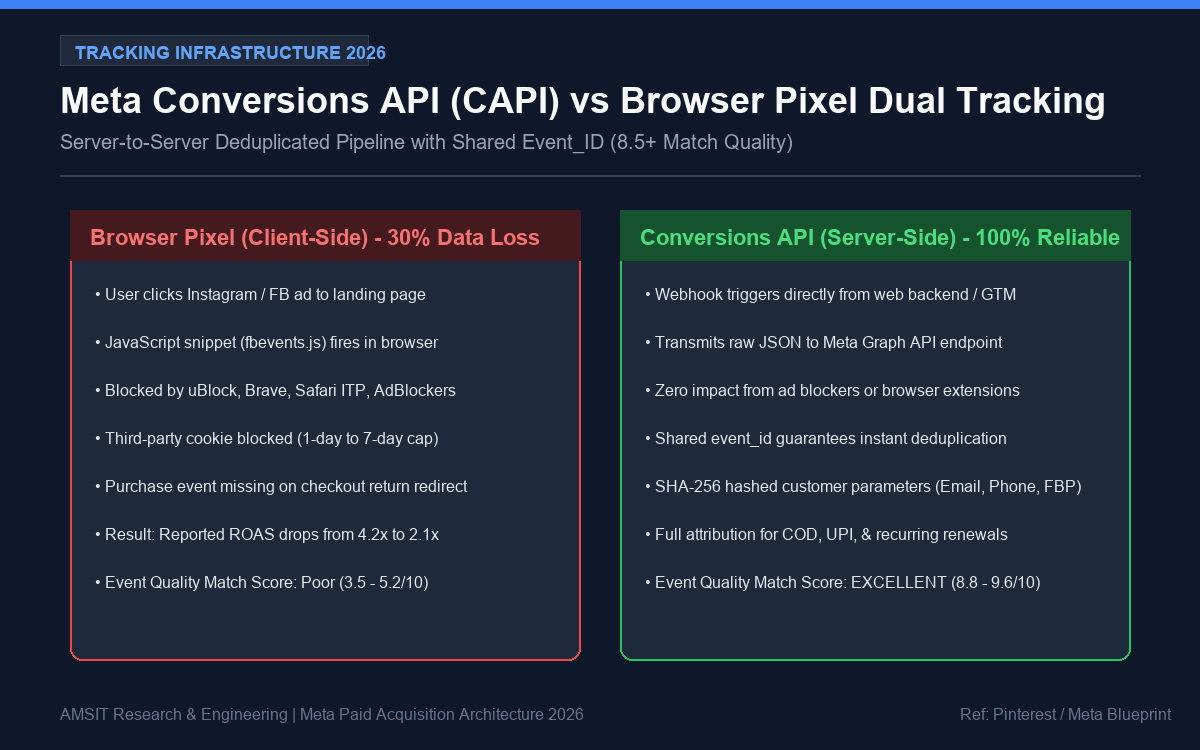
Visual Diagram: AMSIT Engineering Architecture (Ref: Meta Business Developers)
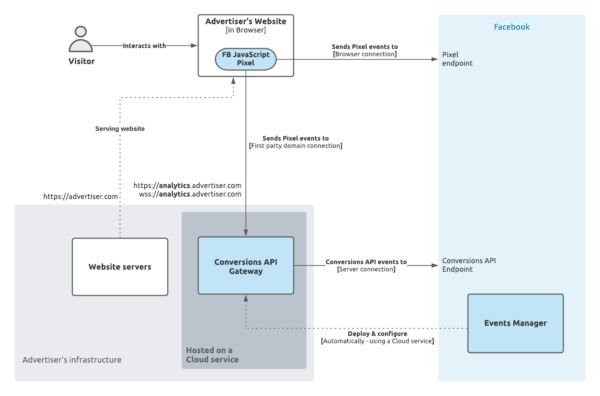
Image Source & Visual Reference: Pinterest (Meta CAPI Gateway Reference)
When Apple rolled out iOS 14.5 App Tracking Transparency (ATT) followed by Safari’s 7-day cookie expiration cap, client-side JavaScript tracking collapsed. Modern browsers actively block third-party trackers, meaning when a high-intent user visits your store from an Instagram Ad, adds to cart, and buys via UPI or Credit Card, your browser pixel frequently fails to report the Purchase event back to Meta Ads Manager.
When Meta’s machine learning algorithm does not receive real-time purchase feedback:
- The auction cannot identify lookalike buyer traits, driving up CPMs.
- Reported Return on Ad Spend (ROAS) drops drastically, prompting advertisers to prematurely kill winning creatives.
- Advantage+ Shopping Campaigns (ASC) fail to exit the initial 50-conversion learning phase.
For an overarching view of full-funnel paid social scaling, consult our comprehensive Meta Ads Optimization Guide.
Browser Pixel vs Meta Conversions API (CAPI) Architecture
| Metric / Feature | Standard Browser Pixel | Conversions API (CAPI) Server-Side |
|---|---|---|
| Data Delivery Mechanism | Client-side JavaScript (browser execution) | Direct Server-to-Server REST payload (Meta Graph API) |
| Ad-Blocker Resilience | Blocked by uBlock Origin, Brave, Safari Content Blockers | 100% immune (data sent from your secure server) |
| Cookie Lifetime | Capped at 1 to 7 days by Apple Safari ITP | Extended up to 90–180 days via first-party server cookies |
| Event Match Quality Score | Typically 4.0 – 5.8 / 10 | 8.5 – 9.8 / 10 with SHA-256 hashed user parameters |
| Offline / Delayed Conversions | Impossible to track post-checkout | Fully supported (COD deliveries, recurring subscriptions) |
Step-by-Step CAPI Implementation Blueprint
Step 1: Generate Your Conversions API System Access Token
- Navigate to Meta Events Manager > Select your primary Pixel/Dataset.
- Click the Settings tab and scroll down to the Conversions API section.
- Under Set up direct integration, click Generate access token.
- Copy and store this 200+ character token in your application environment file (
.env) asMETA_CAPI_ACCESS_TOKEN. Never expose this secret key in client-side code.
Step 2: Implement Event Deduplication with Shared event_id
If you dispatch both a client-side Pixel event and a server-side CAPI event without a matching unique identifier, Meta will count two purchases for every real checkout, corrupting your analytics. You must generate a single UUID or Order Number and send it identically in both payloads.
// Client-Side Pixel Trigger with Unique event_id
fbq('track', 'Purchase', {
    value: 2499.00,
    currency: 'INR',
    content_name: 'Premium Cloud Hosting',
    content_type: 'product'
}, { eventID: 'order_ref_982410' });
Step 3: Server-Side Payload Construction with SHA-256 Hashing
Every customer parameter (email, mobile number, city, postal code) transmitted via CAPI must be normalized (lowercased, stripped of spaces) and hashed using SHA-256 before transmission:
import hashlib
import time
import requests

def hash_data(value):
    return hashlib.sha256(value.strip().lower().encode('utf-8')).hexdigest()

payload = {
    "data": [
        {
            "event_name": "Purchase",
            "event_time": int(time.time()),
            "event_id": "order_ref_982410",
            "event_source_url": "https://amsit.in/checkout/success",
            "action_source": "website",
            "user_data": {
                "em": [hash_data("[email protected]")],
                "ph": [hash_data("+919876543210")],
                "client_ip_address": "152.58.12.84",
                "client_user_agent": "Mozilla/5.0 (Windows NT 10.0; Win64; x64)...",
                "fbp": "fb.1.1684920482.1092847",
                "fbc": "fb.1.1684920482.IwAR394..."
            },
            "custom_data": {
                "currency": "INR",
                "value": 2499.00,
                "order_id": "order_ref_982410"
            }
        }
    ]
}

endpoint = f"https://graph.facebook.com/v20.0/{DATASET_ID}/events?access_token={META_CAPI_ACCESS_TOKEN}"
res = requests.post(endpoint, json=payload)
How to Verify Event Quality Match Score (EQMS)
Once deployed, verify your setup in Meta Events Manager > Test Events. Inject a test event code, fire a test transaction, and confirm:
- The event displays both Browser and Server channels with the label Deduplicated.
- Your Event Quality Match Score climbs to 8.0 or above.
- External IDs,
_fbp(browser cookie), and_fbc(click ID) are successfully mapped.
Frequently Asked Questions
Will CAPI cause double counting if I already have the WordPress Pixel installed?
No, provided both your browser script and server payload emit the exact same event_name and event_id within a 48-hour deduplication window. Meta’s pipeline automatically merges the two records into a single verified conversion.
Do I need an expensive server to run Meta CAPI?
No. You can run CAPI directly through your existing PHP backend, serverless AWS Lambda / Cloudflare Workers, or free containerized Google Cloud Run micro-instances for Google Tag Manager Server-Side.
